
—
How to access blocked websites the easy way. Yes, it works!
—
 Malaysia Chronicle
 MALAYSIA CHRONICLE HAS BEEN BLOCKED. PLEASE GO TO OUR FACEBOOK FOR STEPS TO READ OUR STORIES https://www.facebook.com/MalaysiaChronicle# …
—
Malaysia Chronicle added 8 new photos.
MALAYSIA CHRONICLE HAS BEEN BLOCKED.
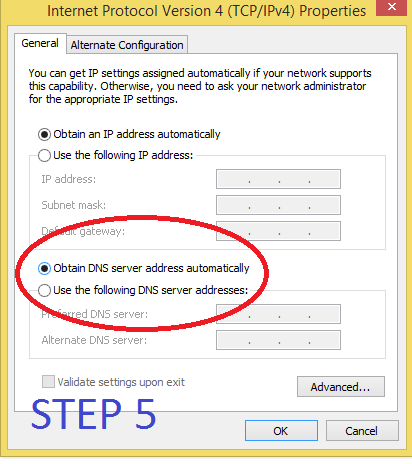
HOWEVER, YOU CAN GET IN BY ADJUSTING YOUR LOCAL COMPUTER DNS.
PLEASE FOLLOW THE STEPS BELOW, IT’S QUITE EASY
IF YOU HAVE PROBLEMS, PLEASE WRITE TO US AT malaysiachronicle@gmail.com
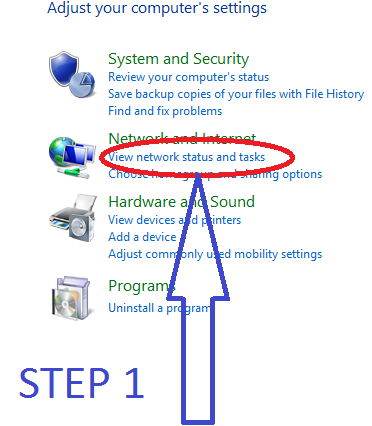
1. Go to Control Panel
2. Select & click into Network & Internet
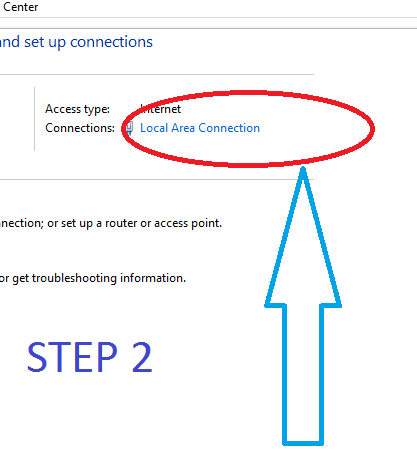
3. Select & click into Network & Sharing Center
4. Select & double click into Local Area Connection
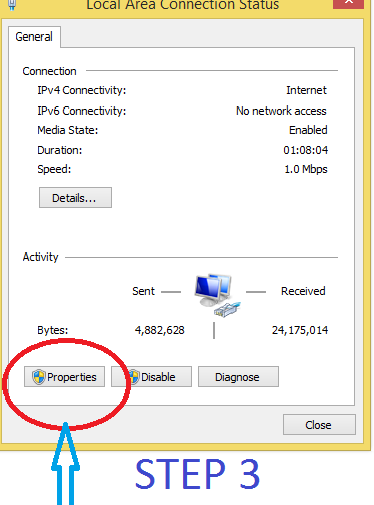
5. Select & click into Properties
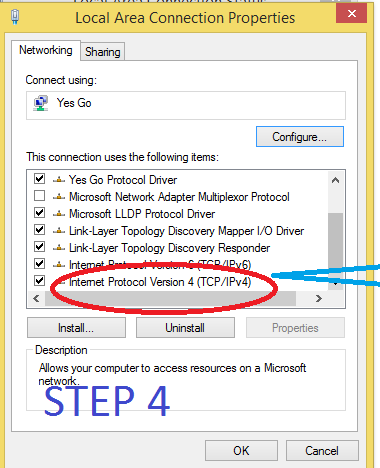
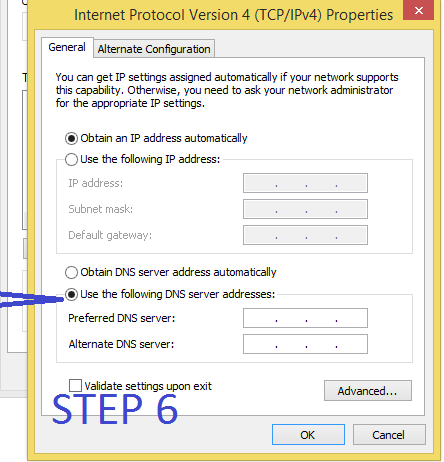
6. Select & double click into Internet Protocol Version 4 (TCP/IPv4)
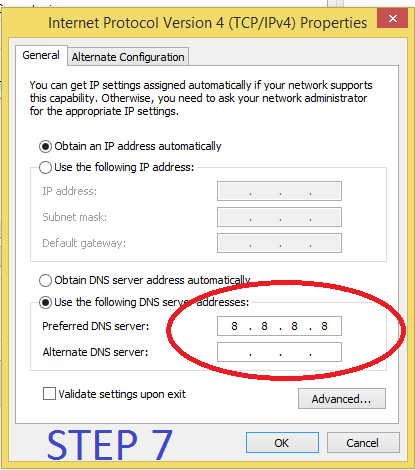
7. Select ‘Use the following DNS addresses’
8. At ‘Preferred DNS server’ type in 8 . 8 . 8 . 8 (i.e type 8 into each of the boxes) (for Yes broadband for example)
or type in 8 8 4 4 (for Maxis broadband for example)
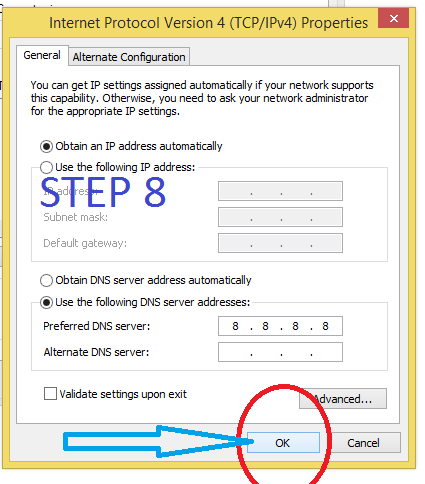
9. Click OK & it will go back to previous menu (as in step 6)
10. Click OK again
11. Finish, you should be able to get into malaysia-chronicle.com
MALAYSIA-CHRONICLE.COM
—
 weehingthong
What about tablets and smartphones?
Dear Mr Wee thanks for the above info – the computer no problem but HOW do I enable (malaysia chronicle) on the smart phone ? Thank you.
I am waiting for them to reply. You could also ask them: https://www.facebook.com/MalaysiaChronicle
Dear Mr.Wee, how about UNIFI?
UNIFI? Subscribe to it through TM.
Just use ZenMate Free VPN and unblock all you want …. http://www.zenmate.com or zenmate.com.my